Internationalization Overview
This chapter provides a technical overview of the internationalization (i18n) system in LabPress. It explains how the platform supports multiple languages through two complementary mechanisms: static language packs for core interface text and the Dynamic Multi-Language plugin for database-stored content.
The chapter is intended for administrators and developers who need to understand how multilingual support works and how to extend it. For detailed instructions on managing translations, refer to the dedicated chapters later in this section.
1. Introduction
LabPress is designed from the ground up to support bilingual and multilingual sites. Unlike many lightweight content management systems that hardcode interface text, LabPress uses a centralized translation function and a database-backed translation layer.
This design allows the following:
- The admin panel and frontend can use different language settings.
- Core interface strings are managed through language files without modifying code.
- User-generated content, such as navigation menus, slides, and homepage sections, can be translated without duplicating database records.
- Plugins can provide their own language packs and integrate with the translation system through filters.
The internationalization system consists of three main components:
- Core language packs stored in
languages/. - The translation function
__()and the locale detection functiongetLocale(). - The Dynamic Multi-Language plugin, which handles translations for database-stored content.
2. Two-Layer Translation Architecture
LabPress separates translation into two layers that operate independently but share the same filter pipeline.
| Layer | Storage | Content Type | Managed By |
|---|---|---|---|
| Static strings | PHP files in languages/{locale}/ | Interface labels, buttons, messages, and default template text | Core language packs |
| Dynamic content | ml_translations database table | Navigation menu titles, slide text, About Us content, research fields, statistics labels, and plugin-specific text | Dynamic Multi-Language plugin |
The static layer covers all text that is part of the application itself. The dynamic layer covers text that is created or edited by site administrators through the admin panel.
Both layers are connected through the translate filter. Every string that passes through the __() function is filtered, allowing plugins to replace it with a translation when available.
3. Core Language Packs
The core language pack system provides the base translation for all interface strings.
3.1 Directory Structure
Language packs are stored in the languages/ directory. Each locale has its own subdirectory, and each module has a separate PHP file within that directory.
languages/
├── zh_CN/
│   ├── lang.config
│   ├── common.php
│   ├── index.php
│   ├── admin.php
│   ├── news.php
│   ├── projects.php
│   ├── tools.php
│   └── publications.php
└── en_US/
    ├── lang.config
    ├── common.php
    ├── index.php
    ├── admin.php
    ├── news.php
    ├── projects.php
    ├── tools.php
    └── publications.php
The lang.config file contains metadata for the language, including its display name, flag, locale code, and text direction. This metadata is used to populate the language switcher in the frontend and the language dropdown in the admin panel.
<?php
// languages/en_US/lang.config
return [
    'name'      => 'English',
    'locale'    => 'en_US',
    'flag'      => '🇺🇸',
    'direction' => 'ltr',
];
3.2 The Translation Function
The core translation function is __(). It accepts two parameters:
$keyis the translation key, such asabout_us_titleornav.home.$moduleis the module name, corresponding to a PHP file in the current locale directory.
When __() is called, it loads the requested language file on demand and returns the translated string. If the key is not found, the key itself is returned as a fallback, ensuring that missing translations do not produce empty output.
The function is used throughout both the admin panel and the frontend templates. For example:
This call loads languages/en_US/index.php if the current locale is en_US and returns the value associated with about_us_title.If you want know more detail about core translation function__()Core Language Packs
3.3 Module Loading and Fallback
Module loading is performed lazily. Only the common module is loaded automatically on the first translation call. Other modules are loaded when they are explicitly requested.
This approach keeps memory usage low, because unused modules are never loaded. The system caches loaded modules within a single request to avoid repeated file inclusion.
If a requested module does not exist, the function returns the original key. No error is raised, which makes the system resilient to missing language files.
4. Language Switching
Language selection is handled differently for the frontend and the backend.
4.1 Frontend Language Selection
The frontend language is determined by getLocale(), which checks three sources in priority order:
- The
langURL parameter. - The
langcookie. - The site default language stored in
site_config.
If a visitor explicitly selects a language using the language switcher in the header, the choice is stored in a cookie and takes effect on subsequent page loads.
The frontend language switcher is rendered automatically if more than one language is available. It displays the available languages and lets users switch without affecting the admin panel language.
4.2 Backend Language Policy
The backend always uses the site default language, regardless of the frontend language cookie or URL parameter. This ensures that administrators see a consistent interface while managing content.
The getLocale() function detects whether the current request is for an admin page by checking the IS_ADMIN constant or the script path. If the request is in the admin area, it returns the default language immediately.
This decoupling means that an administrator can keep the backend in English while visitors browse the frontend in Chinese, or vice versa.
4.3 Available Languages
The list of available languages is discovered automatically by scanning the languages/ directory. The getAvailableLanguages() function reads each subdirectory’s lang.config file and builds an array of metadata.
Adding a new language to the system is therefore as simple as creating a new directory with a valid lang.config file and the required language files. The new language will appear in the language switcher and the admin language dropdown without code changes.
5. Dynamic Multi-Language Plugin
The Dynamic Multi-Language plugin extends the core i18n system to handle database-stored content.
5.1 Purpose
Core language files can translate only strings that exist in the codebase. They cannot translate content that administrators type into the admin panel, such as navigation menu titles, slide descriptions, or the About Us text.
The Dynamic Multi-Language plugin solves this problem by providing a translation management interface for database content. It allows administrators to enter translations for all user-editable text without touching the database directly.
5.2 How It Works
The plugin registers itself on the init hook and then adds filters to the LabPress hook system.
The most important filter is translate. Whenever a string passes through the __() function, the plugin checks whether a translation exists in the ml_translations table for the current locale. If a translation is found, it replaces the original string.
The plugin also registers filters on specific data points, such as nav_menu_item for menu items and slides_data for slide data. This allows it to translate structured content that is not processed through __().
5.3 Translation Storage
Translations are stored in the ml_translations table. Each row contains:
| Column | Description |
|---|---|
table_name | The logical source of the original string, such as nav_menu, slides, site_config, or __custom |
record_id | The unique identifier of the original record or the original string itself |
field_name | The field within the record, such as title or description |
locale | The target language code |
translated_value | The translated text |
A unique constraint on table_name, record_id, field_name, and locale prevents duplicate translations.
5.4 Admin Interface
The plugin adds a new admin page under the sidebar with the title Dynamic Multi-Language. This page organizes translations into several tabs:
- Nav Menus – translate header and footer menu titles.
- Slides – translate slide titles and descriptions.
- About / Research – translate the About Us text, research title, and research subtitle.
- Dynamic Content – translate statistics labels and research direction card texts.
- Plugin Language – translate the plugin’s own interface strings.
The page also includes a source locale selector. The source locale defines the language in which the original content is written. Translations are then managed for all other available languages.
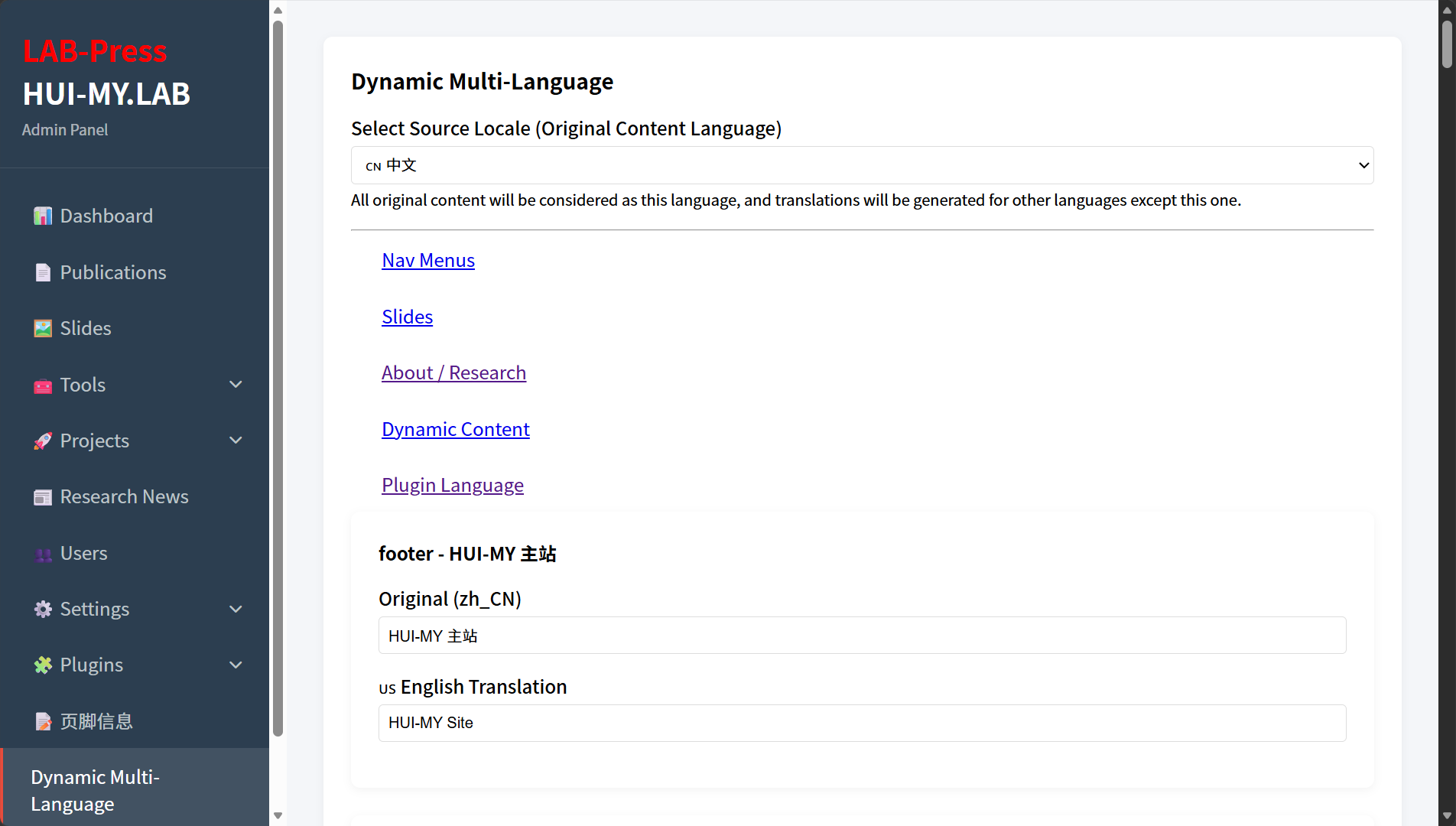
Dynamic Multi-Language Admin Page
6. Frontend and Backend Decoupling
One of the key design goals of the i18n system is to keep the frontend and backend language contexts completely separate.
The backend uses the site default language so that administrators can work with a consistent interface. The frontend respects visitor language preferences. This separation is implemented in getLocale() and is independent of content translation.
Because the Dynamic Multi-Language plugin skips translation when the current request is an admin page, the admin interface always shows the original database content. This prevents administrators from being confused by translated values when editing the site.
7. Plugin Language Support
Plugins can provide their own language files and participate in the translation system.
7.1 Automatic Loading
When the core initializes, it scans all active plugins and loads their language files for the current locale. This automatic loading allows plugin interface strings to be translated without additional code.
The plugin language files are stored in the plugin’s languages/ directory and follow the same naming convention as core language files, for example zh_CN.php and en_US.php.
7.2 Explicit Plugin Loading
Because plugin language keys can conflict with core keys, LabPress supports explicit plugin-language loading using a special module prefix.
To load a string from a specific plugin, use the plugin: prefix followed by the plugin directory name:
This instructs the translation function to load the language file from the specified plugin only, avoiding global key conflicts. Plugin developers are encouraged to use unique key prefixes, such as ml_, fi_, or a plugin-specific abbreviation, even when using explicit loading.
8. Extending Internationalization
The i18n system can be extended in several ways.
8.1 Adding a New Language
To add a new language, create a new subdirectory under languages/ with a valid lang.config file and the required language files. The language will automatically appear in the frontend language switcher and the admin language dropdown.
Core modules should be translated and placed in the new locale directory. Active plugins may also need language files in their own languages/ directories.
8.2 Using Hooks
Developers can modify translation behavior through the LabPress hook system. Relevant hooks include:
| Hook | Type | Description |
|---|---|---|
translate | Filter | Applied to all translated strings. Can be used to implement custom translation logic. |
nav_menu_item | Filter | Applied to each rendered menu item. Used for menu title translation. |
slides_data | Filter | Applied to slide data before output. Used for slide translation. |
stat_value | Filter | Applied to statistics values before output. |
page_title_full | Filter | Applied to the final page title string. |
Plugin developers can register additional filters to support translation for custom content types.
9. Next Steps
This overview introduced the components and architecture of the LabPress internationalization system. For practical guidance, continue with:
- Core Language Packs – details about language file structure and the
__()function. - Dynamic Multi-Language Plugin – instructions for managing database content translations.
- Plugin Development – how to create plugins with their own language support.
- Hooks Reference – complete list of available filters and actions.